
Wispr Flow Alternatives: 7 Mac Apps That Work Offline (2026)
Key takeaways
- Wispr Flow says transcription always happens in the cloud. All 7 alternatives here can transcribe on your Mac with no internet connection.
- Wispr Flow Pro costs $12 a month billed yearly or $15 month to month, so 2 years cost $288 to $360. Seam, VoiceInk and Wavenote are one-time purchases under $40.
- The free Wispr Flow alternatives are Handy (open source, Mac, Windows and Linux), Spokenly's local dictation and the Dictation built into macOS.
- In our Activity Monitor tests on one MacBook in February 2026, Seam used about 12% CPU while dictating, Wispr Flow 47.7%, Superwhisper 50.9% and Spokenly 60.5%.
- Stay with Wispr Flow if you need its AI cleanup of filler words or dictation on Windows, iPhone and Android with one synced dictionary.
The short answer: if you’re leaving Wispr Flow because your voice goes to the cloud, or because Pro costs $12 to $15 a month, every app on this list transcribes on your Mac. Pick VoiceInk for a dictation-only app with open code, Superwhisper for the most models, Handy or Spokenly if it has to be free, and Seam, which we make, if you’d rather your dictation key lived in a notch app that also runs your music, focus timer and calendar.
We build Seam, so read our pick with that in mind. We read each price below on the maker’s own site on 13 November 2026, and the CPU numbers come from our own tests on one Mac, which you can repeat in Activity Monitor.
Why people look for a Wispr Flow alternative
Wispr Flow is good. Its AI rewrites what you said into clean sentences, it learns your words, and it runs on Mac, Windows, iPhone and Android. 3 things send people looking anyway:
- The audio leaves your Mac. Wispr’s own data page says “transcription always occurs on the cloud”. Privacy Mode stops them keeping it, but every word still makes the trip. No internet, no dictation.
- It’s a subscription. Pro is $12 a month billed yearly or $15 month to month. The free plan caps you at a weekly word count, and Wispr no longer prints the number on its pricing page.
- It’s heavy. In our test it ran 12+ processes and about 47.7% CPU while dictating. On a MacBook Air on battery, you feel that.
If none of those bother you, stay. If one does, here’s what to use instead.
The 7 alternatives at a glance
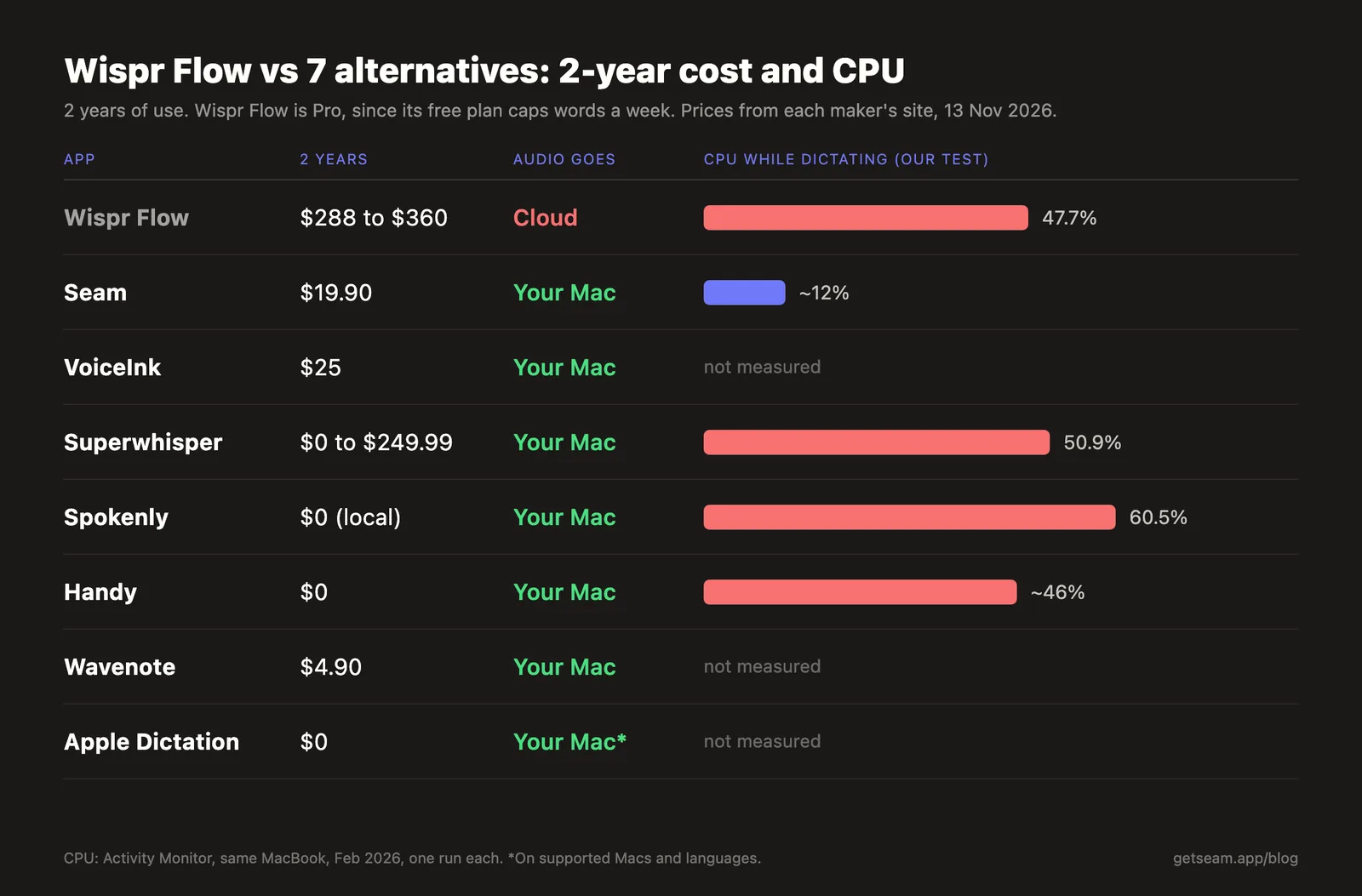
| App | Price | 2 years of use | Runs offline | Platforms | CPU while dictating (our test) |
|---|---|---|---|---|---|
| Wispr Flow (for reference) | Free (weekly cap) or $12 to $15/mo | $288 to $360 | No | Mac, Windows, iPhone, Android | 47.7% |
| Seam | $19.90 once, 2 Macs | $19.90 | Yes | Mac | ~12% |
| VoiceInk | $25 once (1 Mac), $39 (2) | $25 | Yes | Mac (Apple silicon) | not measured |
| Superwhisper | Free, Pro $8.49/mo or $249.99 once | $0 to $249.99 | Yes | Mac, Windows, iPhone, Android | 50.9% |
| Spokenly | Local free, Pro $12 to $15/mo | $0 | Yes (local mode) | Mac, iPhone, Windows | 60.5% |
| Handy | Free, open source | $0 | Yes | Mac, Windows, Linux | ~46% |
| Wavenote | $4.90 once (launch price) | $4.90 | Yes | Mac, iPhone | not measured |
| Apple Dictation | Built into macOS | $0 | Yes, on supported Macs | Mac | not measured |
The CPU column is from Activity Monitor during active dictation on the same MacBook, February 2026, one test each. Versions have moved since, so read it as a rough order. It isn’t a lab benchmark.
1. Seam: dictation inside a notch app
Seam is a notch app first. It turns the black strip at the top of your MacBook into a place for music, AirPods battery, a focus timer and your next meeting. Voice typing is one of its features: hold a key, speak, let go, and the text lands in whatever app you’re in.
- Price: $19.90 once, for 2 Macs, with a 48-hour free trial and no card.
- Where the audio goes: nowhere. The speech model runs on your Mac in one process, at about 12% CPU in our test.
- Learns your words: type over a misheard name and Seam keeps the pair, on your Mac.
- Languages: 25, detected automatically.
- What it doesn’t do: rewrite your filler words with AI. It also has no Windows or phone app.
Pick it if you want to stop paying for dictation and you’d use the rest of the notch. If you only want dictation and nothing else in your menu bar, VoiceInk below is the closer match.
We compared Seam and Wispr Flow head to head, with screenshots and the CPU test, in Seam vs Wispr Flow.
2. VoiceInk: the open-source one-time buy
VoiceInk is the closest thing to Wispr Flow on a single price tag. It runs Whisper models on your Mac, its code is on GitHub, and an optional cloud step only sends text, never audio.
- Price: $25 for 1 Mac, $39 for 2, $49 for 3, one time.
- Needs: an Apple silicon Mac on macOS 14.4 or later.
- Watch for: its context feature asks for Screen Recording permission.
Pick it if you want a dictation-only app you pay for once and can read the code of. More in Seam vs VoiceInk.
3. Superwhisper: the most models
Superwhisper lets you pick from many local Whisper models and add cloud ones, and it now runs on Windows, iPhone and Android too. Its free plan covers dictation with local models.
- Price: free, or Pro at $8.49 a month, $84.99 a year or $249.99 once.
- Needs: macOS 14 for current versions. Offline models want Apple silicon.
- Watch for: 50.9% CPU in our test, the second highest here.
Pick it if you want to tune models and modes, or you need the same app on Windows. See Seam vs Superwhisper.
4. Spokenly: a free local mode with a paid cloud tier
Spokenly gives you unlimited on-device dictation for $0, with no account. Pro adds cloud models and AI features.
- Price: local free, Pro $12 a month billed yearly or $15 month to month.
- Languages: 100+, the only free pick here that matches Wispr Flow’s count.
- Watch for: 60.5% CPU in our test, the highest we’ve measured.
Pick it if you want a free Wispr Flow alternative that still covers 100+ languages. Our test is in Seam vs Spokenly.
Type 4x Faster With Your Voice
Dictate anything, anywhere on your Mac. Private, instant, on-device.
Download for free
5. Handy: free and open source, on every desktop
Handy is MIT licensed, free, and runs on Mac, Windows and Linux. It downloads Whisper or Parakeet models once and transcribes on your computer after that.
- Price: $0.
- Watch for: its makers built it on Tauri, a web view over Rust, and it used about 46% CPU across several processes in our February test.
Pick it if you left Wispr Flow on Windows or Linux and want the same tool on every machine. See Seam vs Handy.
6. Wavenote: when you want to keep what you said
Wavenote is our other app, so the same caveat applies. It does push-to-talk dictation on your Mac, but its focus is what Wispr Flow throws away: each memo stays in a library you can search, with its recording, and it has an iPhone app.
- Price: $4.90 once at launch, down from $9.90.
- Pick it if your dictations are notes you’ll want next week. Text you type into an email and forget doesn’t need it.
7. Apple Dictation: already on your Mac
macOS ships its own dictation. Turn it on in System Settings, then Keyboard, and press the microphone key or your shortcut.
- Price: nothing extra.
- Watch for: it stops after 30 seconds of silence, has no custom dictionary, and Apple’s best on-device punctuation needs an M3 or later with 12 GB of memory, in English.
Pick it if you dictate a few lines a day and don’t want to install anything.
Free Wispr Flow alternatives
3 apps on this list cost nothing and keep your voice on your Mac:
- Handy: open source, Mac, Windows and Linux.
- Spokenly: free unlimited local mode, 100+ languages.
- Apple Dictation: built in, fine for short bursts.
Superwhisper’s free plan belongs here too if you’re happy with its local models. If you’d pay once to skip a subscription for good, Wavenote at $4.90, Seam at $19.90 and VoiceInk at $25 all cost less than 2 months of Wispr Flow Pro billed monthly.
When to stay on Wispr Flow
Be honest with yourself about 2 things before you switch:
- AI cleanup. Wispr Flow turns “um, so, like, can we move the call” into “Can we move the call?” None of the on-device apps above polish as well by default. VoiceInk, Superwhisper and Spokenly can add an AI step, but that step goes to the cloud too.
- Every device. Wispr Flow runs on Mac, Windows, iPhone and Android with one synced dictionary. Superwhisper is the only alternative here on all 4.
Frequently Asked Questions
What is the best free Wispr Flow alternative?
Handy, if you want open source on Mac, Windows or Linux. Spokenly, if you want 100+ languages for free on your Mac. Both transcribe on your computer.
Is there a Wispr Flow alternative that works offline?
All 7 apps here do. Wispr Flow is the one that doesn’t: its data page says transcription always happens in the cloud.
What’s the cheapest one-time alternative to Wispr Flow?
Wavenote at $4.90 during its launch, then Seam at $19.90 for 2 Macs and VoiceInk at $25 for 1 Mac. Wispr Flow Pro costs $144 a year billed yearly.
Does any alternative clean up filler words like Wispr Flow?
Superwhisper, Spokenly and VoiceInk can run an AI pass on your text, usually through a cloud model or your own API key. Seam and Handy type what you said, word for word.
Try the one that also fixes your notch. Download Seam. It’s $19.90 once for 2 Macs, and the 48-hour trial asks for no card.
Related Reading
Type 4x Faster With Your Voice
Dictate anything, anywhere on your Mac. Private, instant, on-device.
Download for free