
10 Best Mac Dictation Apps in 2026, Tested and Ranked
Typing is slow. Every Mac user knows this. You can think and speak way faster than your fingers can move. That’s why dictation apps have exploded on macOS. Hold a key, talk, and your words appear as text. No cloud. No subscription. Just your voice and your Mac.
Note: This guide is for macOS. All apps listed here run on Mac. Most are Mac-only. If you’re on Windows or Linux, this list is not for you.
But not all dictation apps are equal. Some are fast. Some are sluggish. Some quietly eat your battery in the background. And some want $10/month just to let you talk to your own laptop.
We tried them all. Here’s what’s actually worth installing.
We make Seam. It’s our pick below, so read that entry knowing who wrote it.
TL;DR: Seam is the fastest and lightest on battery. You’ll barely notice it running. VoiceInk is the best dedicated dictation app if you want open source. Fluid Voice is completely free and surprisingly good.

What We Looked For
- Speed: Does text appear instantly, or do you wait awkwardly?
- Battery life: Can you use it all day without watching your percentage drop?
- Privacy: Does your voice stay on your Mac, or get sent to a server somewhere?
- Accuracy: Does it actually get your words right?
- Works everywhere: Can you dictate into any app, or just specific ones?
The 10 Best Mac Dictation Apps
1. Seam: Fastest, Lightest on Battery
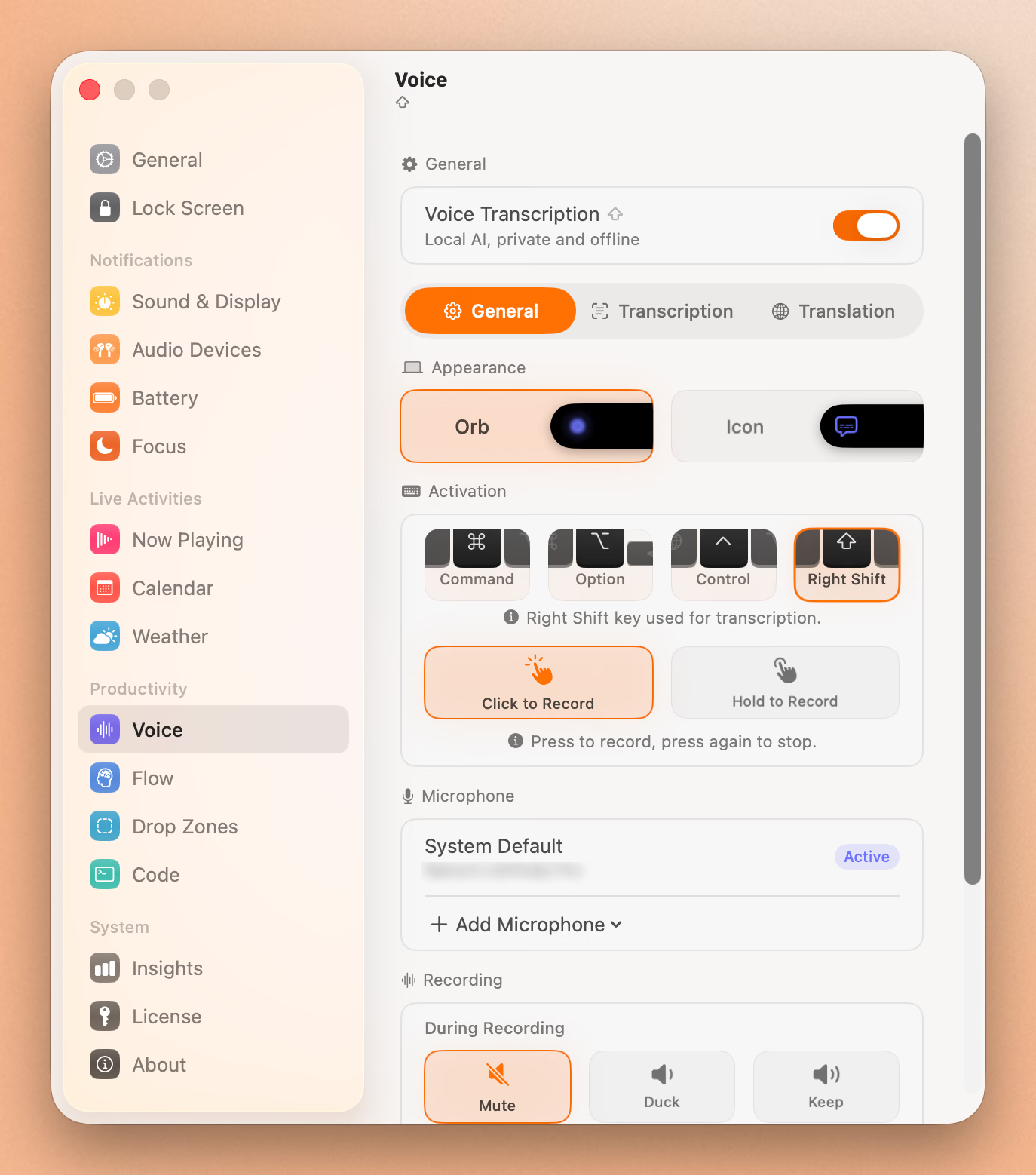
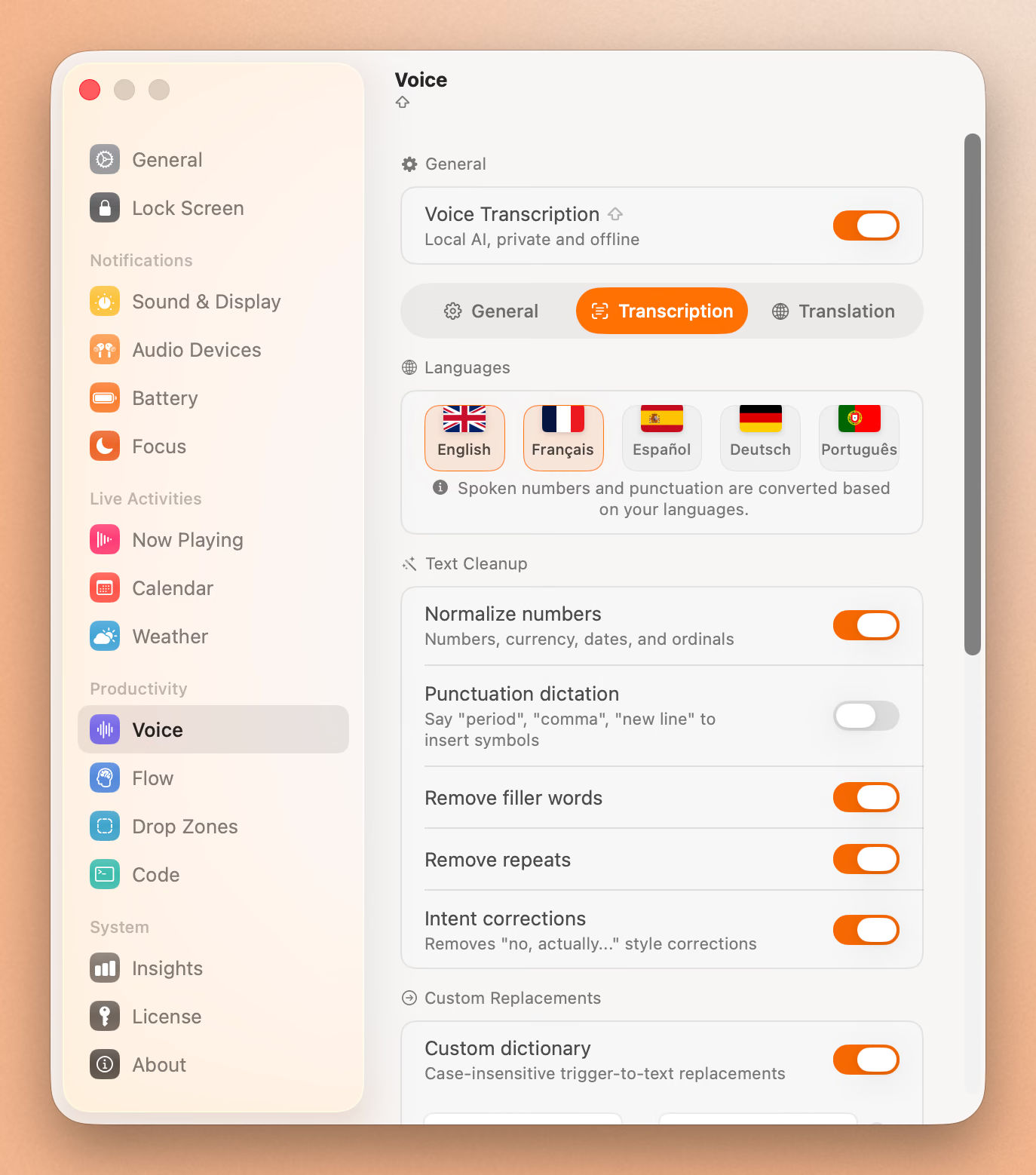
Seam isn’t just a dictation app. It’s a productivity hub that lives in your MacBook’s notch (think music controls, focus timers, calendar). But its voice-to-text is the best we’ve tested.
Why it’s #1: Hold Fn, speak, release. Your text is there in under a second. That’s it. No loading spinner, no waiting. And unlike most dictation apps, Seam barely registers in Activity Monitor. Your fans stay quiet. Your battery stays full.
Most dictation apps keep their speech model loaded in memory all day. Seam loads it when you need it, dumps it when you don’t. The difference shows up on long workdays. Seam users won’t notice any battery hit, while heavier apps can shave off 15-20% over a full day of occasional use.
It also uses a newer, more efficient speech model than most competitors (Parakeet instead of Whisper), which is why it’s faster while using less energy.
It also learns the words it gets wrong. Correct a name after dictating and Seam keeps the pair, so you fix it once instead of every week. More on that below.
Works in: Any app. Slack, Notion, VS Code, Mail, you name it. Price: One-time purchase from $29 (no subscription, ever) Privacy: 100% local. Nothing leaves your Mac.
2. VoiceInk: Best Open-Source Dictation App
VoiceInk has built a passionate community around a simple promise: accurate, private dictation that you own forever.
- Works in any Mac app
- 100+ languages
- AI text cleanup (fix grammar, remove filler words)
- Completely offline. Your voice never leaves your Mac
- Open source on GitHub
The accuracy is excellent, close to 99% in our testing with clear speech. It’s a bit heavier on CPU than Seam during active transcription, but not enough to worry about for most people.
Price: One-time. $25 (1 Mac), $39 (2 Macs), $49 (3 Macs) Best for: People who want a dedicated, polished dictation app they can inspect the source code of.
3. Fluid Voice: Best Free Option
Fluid Voice is the real deal. Fully open source, completely free, no premium tier hiding the good stuff.
- Free forever, no feature gates
- Works system-wide in any app
- Fast on Apple Silicon Macs
- 25+ languages
- Open source on GitHub
It doesn’t have the AI text cleanup that VoiceInk offers, and the community is smaller. But for a completely free app, the speed and accuracy are impressive. If you’re on a budget, start here.
Price: Free Best for: Anyone who wants solid dictation without paying anything.
4. Spokenly: Dictation + AI Writing
Spokenly goes beyond basic transcription. Speak naturally, and it can clean up your grammar, format your text, and even run voice commands.
- AI-powered text processing (GPT-4, Claude)
- Voice commands to launch apps, search the web, run Shortcuts
- 100+ languages with auto-detection
- Full transcription history
- Free for local use
The AI features are impressive but require either your own API keys or a Pro subscription. The local-only dictation is free and works well on its own.
Price: Free (local), $7.99/month (cloud + AI features) Best for: People who want their dictation cleaned up and polished automatically.
5. Superwhisper: Most Customizable
Superwhisper lets you pick exactly how much horsepower you want. Small, fast model for quick notes? Done. Huge, accurate model for important transcriptions? Also done.
- Multiple model sizes (from tiny to ultra-accurate)
- Works offline
- Meeting recording and transcription
- Custom presets for different workflows
The flexibility is great, but the pricing is steep. $8.49/month or $249.99 for lifetime access. The free tier is quite limited.
Price: Free (limited), $8.49/month, or $249.99 lifetime Best for: Users who want fine-grained control over accuracy vs. speed.
6. Sotto: Simple and Clean
Sotto doesn’t try to be everything. It’s a clean, open-source dictation app that does one thing well.
- Open source on GitHub
- Multiple model options
- Automatic grammar fixes and filler word removal
- 90+ languages
- No subscription
If you find the other options overwhelming, Sotto’s simplicity is refreshing.
Price: One-time purchase (no subscription) Best for: People who want a no-nonsense dictation tool.
7. Voibe: Made for Developers
Voibe is built specifically for people who code. It understands technical vocabulary and plugs directly into developer tools.
- Works with Cursor, VS Code, and other coding tools
- Custom dictionary for technical terms
- 100% on-device processing
- Fast, under 300ms latency
The free tier is limited to 300 words/day, which isn’t much. But if you’re a developer who dictates code or documentation regularly, the paid plan is worth it.
Price: Free (300 words/day), $4.90/month unlimited Best for: Developers who want to talk instead of type.
8. MacWhisper: Best for Transcribing Recordings
MacWhisper is different from the others. It’s built for transcribing audio files, not live dictation.
- Drag and drop audio files to transcribe
- Batch processing for multiple files
- Speaker detection and timestamps
- Translation support
- One-time purchase
If you need to transcribe a podcast episode, a meeting recording, or a lecture, MacWhisper is the tool. It’s not really designed for live voice-to-text input.
Price: Free (basic), Pro from €8 one-time Best for: Podcasters, journalists, researchers.
9. Wispr Flow: AI Writes for You
Wispr Flow is less about transcription accuracy and more about output quality. Speak messily, get clean text.
- Automatically removes filler words, fixes grammar, formats text
- Works in any app
- 100+ languages
- Great accessibility features
The catch: it’s cloud-based. Your audio goes to their servers for processing. If privacy is a priority, this isn’t for you. If you just want the cleanest output, it’s hard to beat.
Price: Subscription Best for: People who want AI to turn their rambling into polished writing.
10. Apple Dictation: Already on Your Mac
Don’t sleep on what’s built in. Apple’s Dictation has gotten surprisingly good, especially on Apple Silicon.
- Free and already installed
- Works offline on Apple Silicon
- Voice commands for punctuation (“period”, “new paragraph”)
- Improved with Apple Intelligence
It won’t match the accuracy of dedicated apps, and there’s no AI text cleanup. But for quick notes and casual use, it’s perfectly fine. You don’t need to install anything.
Price: Free Best for: Casual use without installing another app.
Quick Comparison
| App | Price | Offline? | Open Source? | Best For |
|---|---|---|---|---|
| Seam | $29 (one-time) | Yes | No | Speed + battery life |
| VoiceInk | From $25 (one-time) | Yes | Yes | Dedicated dictation |
| Fluid Voice | Free | Yes | Yes | Budget-friendly |
| Spokenly | Free / $7.99/mo | Yes (local) | No | AI-enhanced writing |
| Superwhisper | Free / $8.49/mo / $249.99 | Yes | No | Customization |
| Sotto | One-time | Yes | Yes | Simplicity |
| Voibe | Free / $4.90/mo | Yes | No | Developers |
| MacWhisper | Free / from €8 | Yes | No | File transcription |
| Wispr Flow | Subscription | No | No | AI polished output |
| Apple Dictation | Free | Yes (Apple Silicon) | No | Casual use |
The Dictionary That Writes Itself
Speech models are trained on the words everybody says. Your work is full of the words almost nobody says: your own name, your company, the tools you open every morning. A model that has never seen “Supabase” will hear “super base” today, tomorrow, and in a year.
Most apps answer this with a list you fill in yourself. Superwhisper has a vocabulary panel. VoiceInk has word replacements. They work, and every mishearing is a trip to settings.
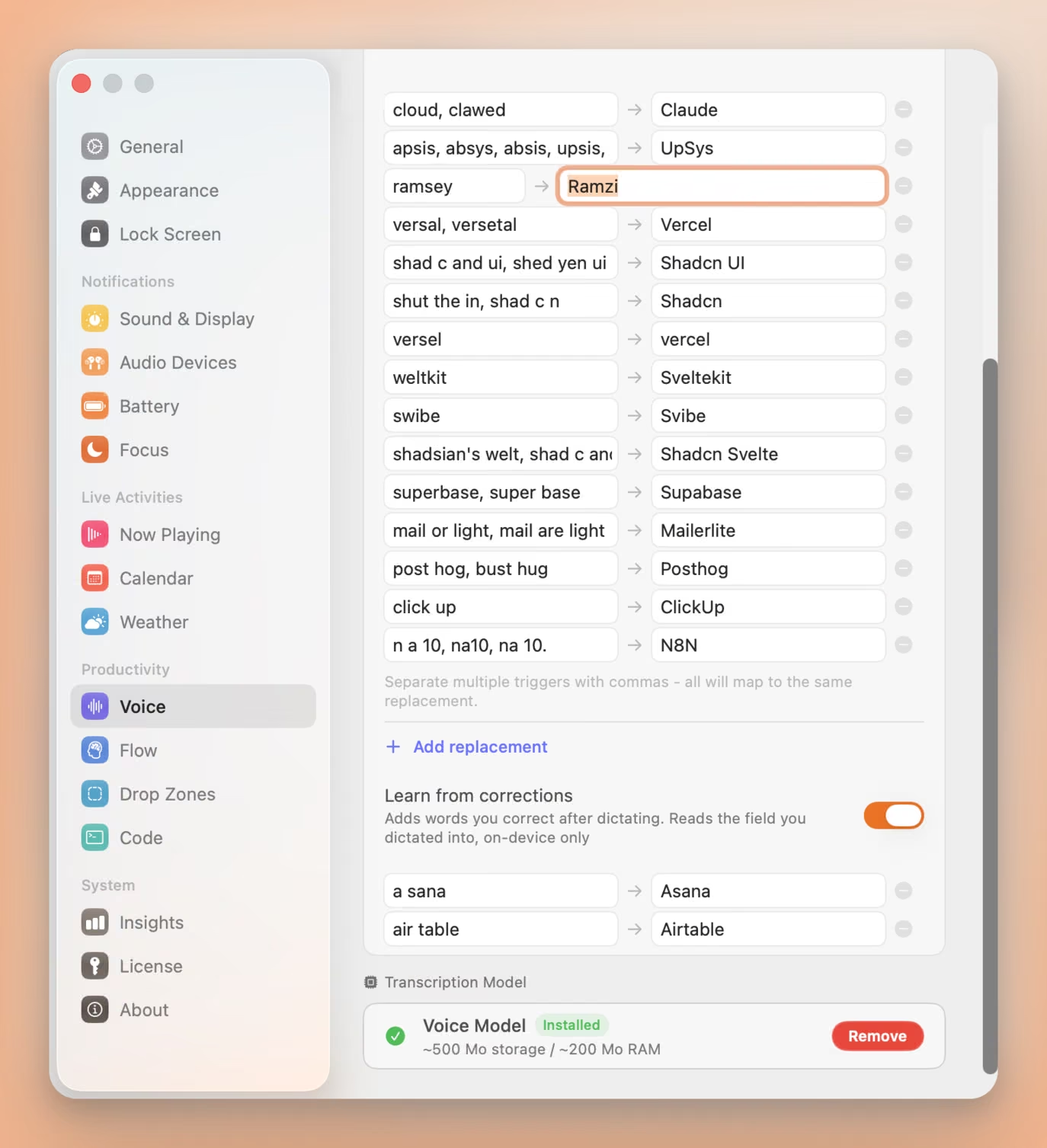
Seam watches the one thing you already do. Dictate “ramsey”, type “Ramzi” over it, and the pair is learned. Say it again next week and it arrives spelled right. You paid for that correction once.
Three things make it safe to leave switched on:
- One field, on your Mac. Seam compares the text box you dictated into against what it inserted, keeps the word pair, and forgets the rest. The field is never stored, never logged, never sent anywhere.
- One-for-one swaps only. A word you replaced with another word gets learned. Rewrites, insertions and deletions are skipped, because a wrong entry costs you more than a missed one.
- A veto, three seconds wide. Each new pair appears in the notch with an X. Press it and the word is dropped and blocklisted, so it is never learned twice.
You can still type entries by hand, and one line covers every way a word gets misheard: “shad c and ui, shed yen ui” both land on “Shadcn UI”.
Wispr Flow learns from corrections too, and syncs those words across your devices through its servers. Seam does the comparison on your Mac and keeps the result there.
Type 4x Faster With Your Voice
Dictate anything, anywhere on your Mac. Private, instant, on-device.
Download for free
Free & Open-Source Options
If transparency matters to you, these apps let you inspect every line of code:
| App | Fully Free? | GitHub |
|---|---|---|
| Fluid Voice | Yes | altic-dev/FluidVoice |
| VoiceInk | Paid ($25+) | Beingpax/VoiceInk |
| Sotto | Yes | gevorggalstyan/sotto |
| OpenWhispr | Yes (local) | OpenWhispr/openwhispr |
Frequently Asked Questions
What is the fastest dictation app for Mac?
Seam. It uses a newer speech model that’s faster and lighter than what most competitors use. Most dictation completes in under a second on any Apple Silicon Mac.
What’s the best free dictation app for Mac?
Fluid Voice if you want a dedicated app. It’s open source and completely free. Apple’s built-in Dictation is also surprisingly capable on recent Macs and requires zero setup.
Do dictation apps drain your MacBook’s battery?
Some do, some don’t. The heavier apps can noticeably impact battery life over a full day. Seam is specifically designed to avoid this. It only uses resources when you’re actively speaking and releases everything when you stop. Most users report zero noticeable battery impact.
Are my recordings sent to the cloud?
Not with most apps on this list. Seam, VoiceInk, Fluid Voice, Sotto, Spokenly (local mode), Superwhisper, and Voibe all process everything on your Mac. Wispr Flow is the exception, as it uses cloud processing.
Can a dictation app learn my vocabulary?
Some can. Superwhisper and VoiceInk give you a list to fill in by hand. Wispr Flow learns from your corrections and syncs the words through its servers. Seam learns from your corrections on your Mac: it reads the field you dictated into, keeps the word pair, and stores nothing else. Every learned entry can be refused with one click.
Can I use dictation in any app?
Yes. Every app on this list (except MacWhisper, which handles files) works system-wide. Dictate into Slack, email, your code editor, Notes, anywhere.
Bottom Line
You have more options than ever for turning speech into text on your Mac. The days of clunky, cloud-dependent dictation are over.
Want the fastest, most battery-friendly option? Download Seam for Mac. Seam transcribes in under a second and you’ll never notice it on your battery. Plus you get music controls, focus timers, and more in your notch.
Want open source? VoiceInk is polished and accurate. Fluid Voice is completely free.
Want AI to clean up your writing? Spokenly and Wispr Flow will turn messy speech into clean text.
Every app on this list (except Wispr Flow) keeps your voice on your Mac. No servers, no subscriptions, no compromises. Pick the one that fits how you work, and start talking.
Related Reading
Type 4x Faster With Your Voice
Dictate anything, anywhere on your Mac. Private, instant, on-device.
Download for free