
A Pomodoro Timer That Lives in Your Mac's Notch
Focus sessions, break reminders, and task tracking. Always visible, never in the way.
seam's Flow is a Pomodoro timer built into your MacBook's notch. Start a focus session with a task name, watch the timer tick in compact mode, and get nudged to take breaks. Unlike standalone timer apps that hide behind windows, Flow is always visible at the top of your screen, right where you naturally look.
Free 48-hour trial, then $29
Why use this?
Always Visible Timer
Your timer lives in the notch, visible on every desktop and full-screen app without switching windows.
Task-Based Sessions
Name your task before starting. Stay accountable to one thing at a time with session tracking.
Smart Break Reminders
Get nudged to take breaks at the right time. The notch expands gently to remind you without interrupting deep work.
Session Tracking
Track how many Pomodoro sessions you complete per task. See your progress without opening a separate app.
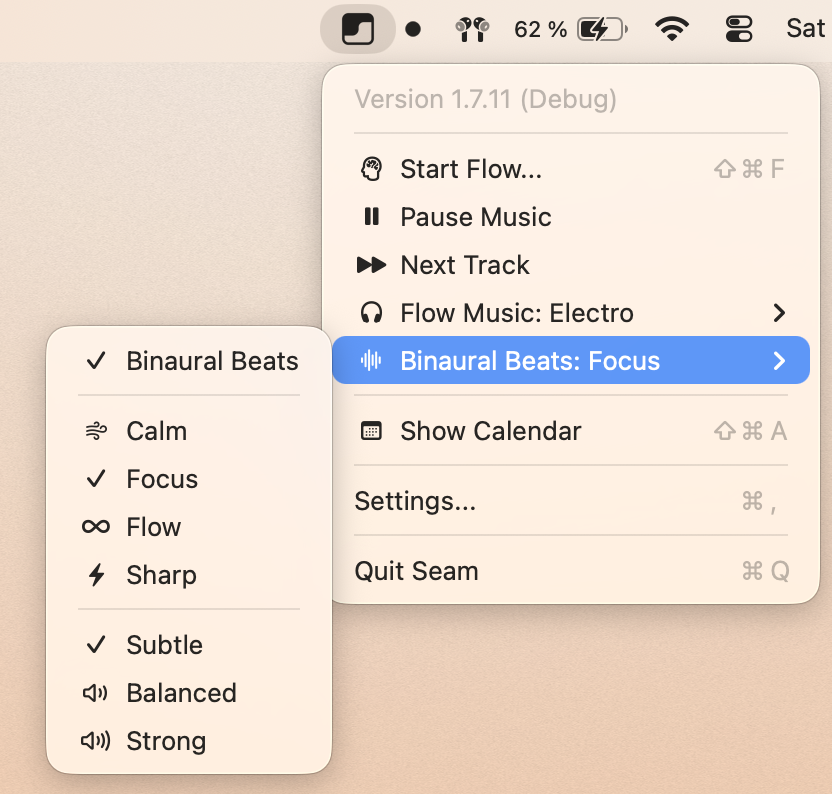
Focus Music + Binaural Beats
Play a Flow Music station (Electro, Tibetan, Lofi, and more) and blend a binaural beats layer underneath. Pick a profile and intensity from the menu bar, no extra app needed.
How it works
Name your task
Click the notch to open Flow setup. Type what you're working on and set your session count.
Hold to start
Press and hold the start button. The notch shrinks to compact mode and your timer begins counting.
Focus, break, repeat
Work through your sessions. The notch alerts you when it's time for a break, then guides you back to focus.
How Seam compares
| seam Flow | Be Focused | Session | Flow.app | |
|---|---|---|---|---|
| Price | $29 (all features) | $4.99 | From $4.99/mo | From $1.49/mo |
| Always visible | Yes (notch) | No (menu bar) | No (window) | No (menu bar) |
| Task naming | Yes | Yes | Yes | No |
| Break reminders | Notch animation | Notification | Notification | Notification |
| 10+ other features | Yes | No | No | No |
| One-time purchase | Yes | Yes | No (subscription) | No (subscription) |
| Native Swift | Yes | Yes | Yes | Yes |
Frequently asked questions
What is the best Pomodoro timer app for Mac? +
How does the Pomodoro technique work on Mac? +
Can I customize the timer duration? +
Does seam work with full-screen apps? +
Is seam just a Pomodoro timer? +
Get all features for one price
seam includes 10 features: Pomodoro timer, voice-to-text, music controls, calendar, and more. One-time purchase, no subscriptions.
Free 48-hour trial, then $29
Also in Seam
Voice to Text That Lives in Your Mac's Notch
Local AI transcription with visual feedback. See your recording status at a glance.
Now Playing: A Music Widget in Your Mac's Notch
Album art, playback controls, and a live visualizer flowing from your notch.
See Focus Mode Status in Your Mac's Notch
Know when Do Not Disturb is active, at a glance, without opening Control Center.